How do I licence everyone with our email domain?
- Disaster Science
- Bushfire.io enterprise
- November 4, 2026
Table of Contents
An email suffix gives a licence to every person whose email address ends with your domain, for example @example.com.au. This includes people who create an account later. You do not need to add each person yourself.
Info
Requires an Organisation Manager or a licence manager on Bushfire.io Enterprise. Part of the Enterprise Admin Guide.
Add an email suffix
- Go to My Organisation > Groups and Licences.
- Select the licence to give.
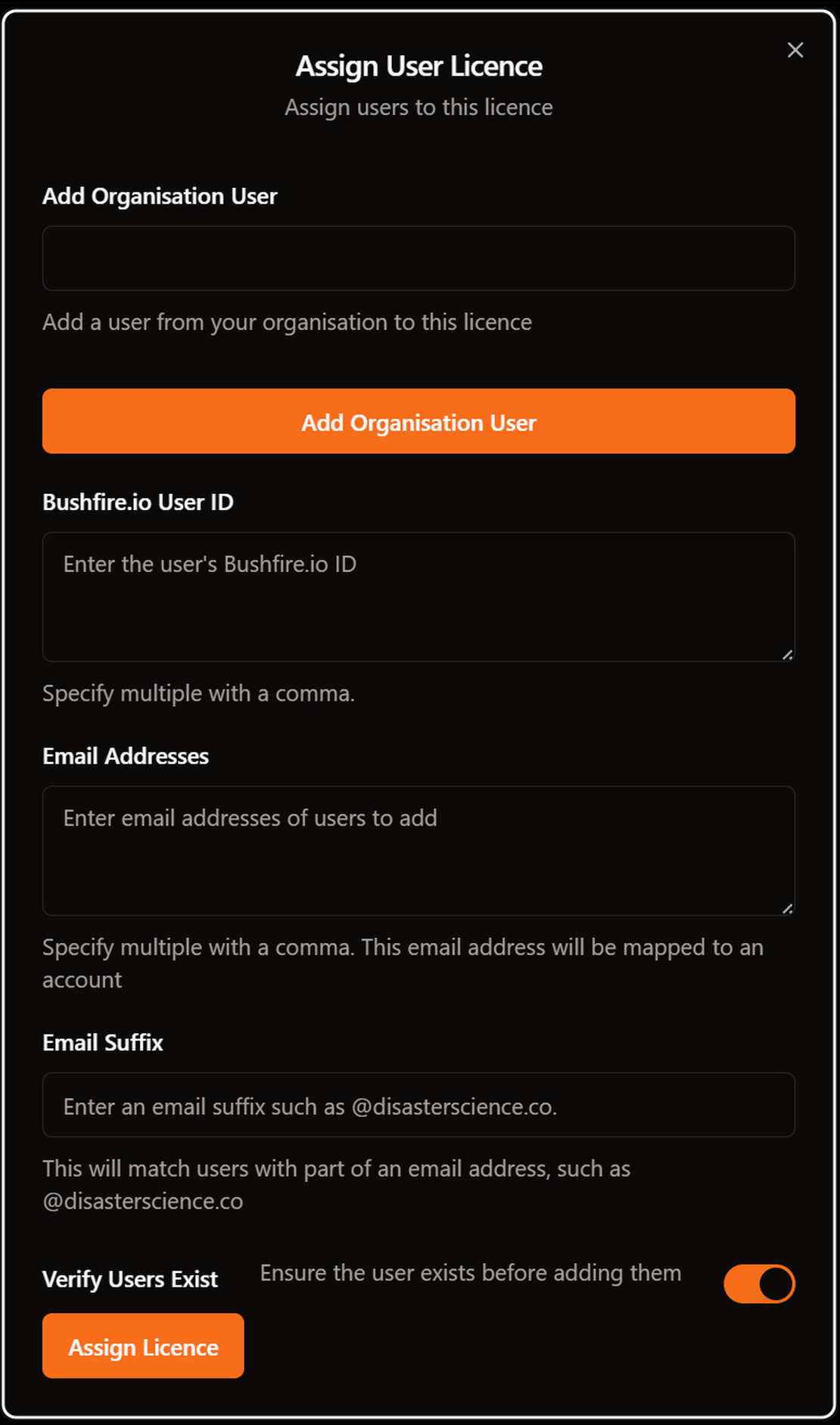
- In the Users section, select the ➕ button. The Assign User Licence dialog opens.
- In Email Suffix, enter your domain. The suffix must start with
@, for example@example.com.au. - Select Assign Licence.

The Users list now shows Email Suffix: @example.com.au. Each person with that domain gets the licence when they sign in with their work email address.
Licence people before they have an account
You can also add single email addresses for people who do not have an account yet.
- In the Assign User Licence dialog, turn off Verify User Exists.
- In Email Addresses, enter the addresses. Separate them with commas, with no spaces.
- Select Assign Licence.
The addresses stay in the Users list. Each person gets the licence when they sign in with that address.
Good to know
- An email suffix matches the exact domain only.
@example.com.audoes not match@mail.example.com.au. - People who get the licence from a suffix do not use seats in the Allocated count.
- People who get the licence from a suffix do not show in Organisation Users. You cannot select them for layer alerts or layer access. If you need to do this, also add their email address to the licence.
- Members must sign in with their work email address. If a person signs in with a personal Google or Apple account, the suffix does not match.
- To stop new people getting the licence, remove the suffix from the Users list. See How do I remove a user?